Saved scenarios, variable speed pumps and remote PRVs, and a model build for DXF and CSV
Last month’s “What’s next” listed six items, and all six shipped in September. Scenarios are now saved with your project, PRVs can regulate pressure at a remote node, and pumps can run at variable speed to hold a target. The model build now reads DXF and CSV, bringing customer points and zones in with the network. Saved selections and map bookmarks arrive as Collections.
We’ve also added a new activity bar and data tables that open on demand (including for selected assets only). Plus, you can now try Pro free for 14 days.
Try Pro free for 14 days. Open to personal emails for October
Every paid feature in this report can be tried free for 14 days on Pro, with no credit card required.
Normally, automated trial activation requires a work email. For the month of October, however, we’re opening free trials up to everyone. If you previously tried to activate a trial with a personal email like Gmail and were turned away, try again now—you’ll get straight through.
If you’ve been using epanet-js and want to test out the new paid features with a personal email, jump into the app during October to start your 14-day trial.
When the trial ends, you can add a card to carry on with Pro. Otherwise, your account returns to the free plan, where saved scenarios stay viewable and saved collections stay usable. Pro and Personal subscribers also have a new Billing portal in the user menu to manage cards, invoices, and subscriptions directly.
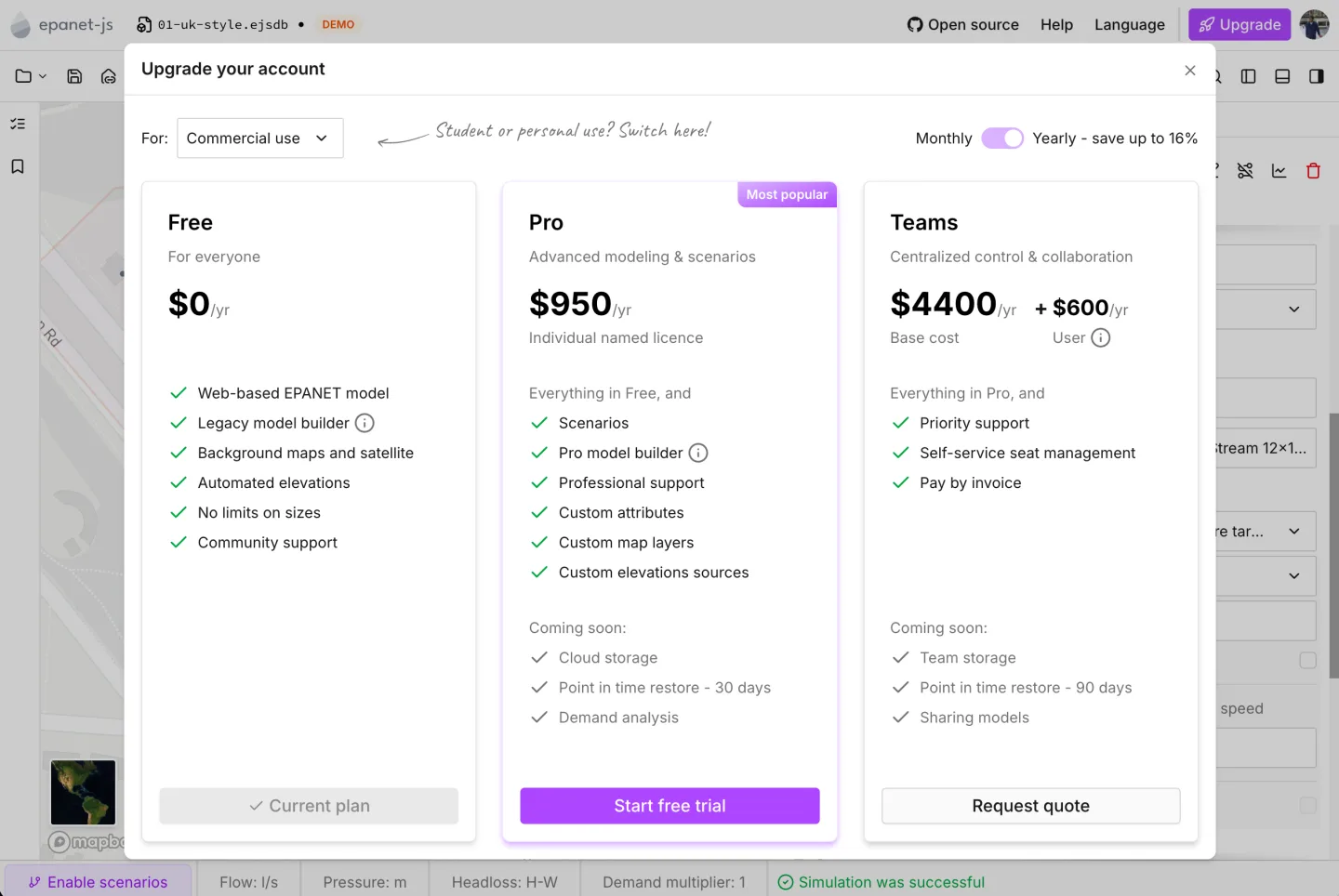
Start a 14-day Pro trial from any upgrade prompt with any email, no credit card required.
Scenarios saved with your project
Paid plansUntil now, scenarios lasted only as long as your session. Saving a project kept the main model, but alternatives disappeared once the tab closed.
Now every scenario is saved inside the project file alongside the main model, taking scenarios out of early access. Projects can hold as many scenarios as you need. epanet-js only loads the active scenario, keeping project load times fast regardless of how many alternatives exist.
Two new actions help build on your work:
- Duplicate (in the scenario menu) copies a scenario with all its changes so you can iterate quickly.
- Current scenario as project (under File > Export) saves a scenario as its own project with changes applied to the main model—ideal for sharing single options with colleagues.
Projects with scenarios open on all plans. Free users can view and switch between scenarios, while editing requires a paid plan (or any demo network).
Variable speed pumps and remote PRVs
EPANET’s standard controls can’t adjust a valve to hold pressure downstream in the network or vary a pump’s speed to hit a target. Both are now available natively in epanet-js without writing code.
PRVs regulating pressure at a remote node
PRVs can now regulate pressure at a critical network point rather than just their outlet. Select a downstream node in the valve’s asset panel under Target node, and epanet-js automatically adjusts the valve at each time step to hold the target pressure there.
The picker lists valid downstream nodes traced within the valve’s supply zone, complete with map previews on hover. Target nodes export with asset tables, vary by scenario, and are available on all plans.
Variable speed pumps
Instead of manually tuning speed patterns, pumps can now target specific network conditions with automatic speed adjustments calculated at every time step.
Two new control types sit in the pump’s Controls:
- Pressure target: Hold a pressure at any node (or target level at a tank).
- Flow target: Hold a target flow through the pump or any pipe.
Controls include min/max speed limits, time-varying targets, and optional tank-level triggers. If a lead pump hits max speed without meeting the target, lag pumps trigger automatically in sequence. Manual speed patterns have also moved here under Pattern-based controls.
Written into the INP, in the open
Both controls save directly to the INP file as Lua scripts in a [SCRIPT] section. Simulations now run on EPANET-LSX—an open-source extension of EPANET 2.3 with an embedded Lua interpreter.
Embedding controls directly in the INP maintains model portability across tools instead of locking them into a proprietary format. EPANET-LSX is MIT-licensed with builds for Windows, macOS, and Linux, and supported in OWA’s EPANET-UI. When exporting an INP with advanced controls, epanet-js highlights which assets require EPANET-LSX while standard models run as normal.
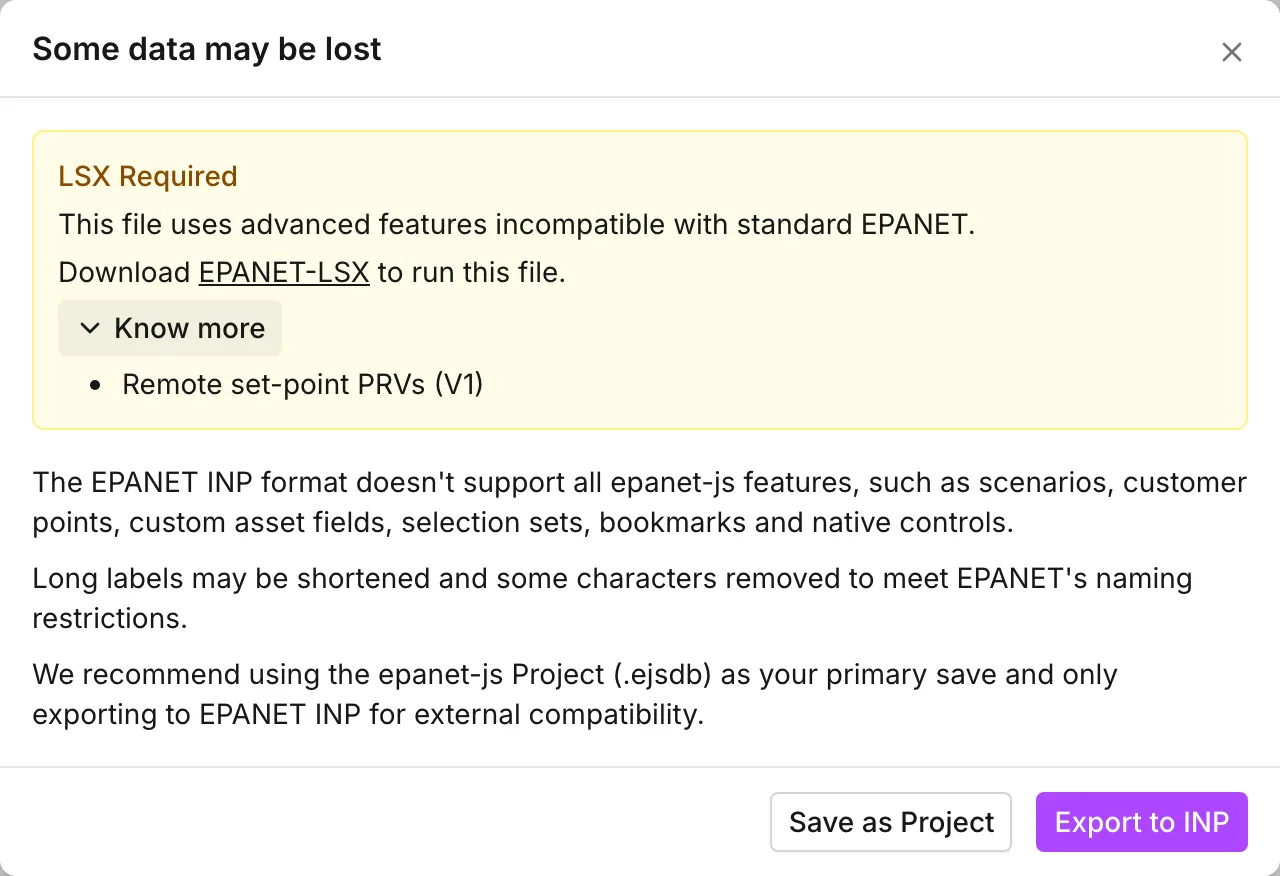
Exporting an INP that uses these controls tells you which assets need EPANET-LSX.
The model build takes more of your data
Paid plansModel data often arrives across multiple sources and coordinate systems. September’s model builder updates focus on accepting raw GIS, CAD, and tabular data seamlessly.
DXF, CSV, and mixed geometries
Alongside GeoJSON and Shapefiles, the model build now supports:
- DXF drawings: Imports points, lines, polylines, circles, arcs, and blocks—automatically scaling mm/cm to meters and reading embedded geolocations.
- CSV point files: Assign X and Y coordinate columns directly.
- Mixed geometry files: Automatically splits multi-geometry files into distinct layer groups.
One file, several layers
A single file often holds more than one kind of asset: a CAD drawing with a layer for each asset type, or a Shapefile with a column saying whether each point is a valve, a hydrant or a meter. A new Layer assignment step, between adding your files and mapping their attributes, sorts it out.
Each group of points, lines or polygons can go to a single layer, or be split across several. Pick an attribute, such as the drawing’s layer name, and each of its values gets a layer of its own, with a count of the records it holds. When one attribute isn’t enough, custom rules send records to a layer by conditions (diameter between 100 and 300, material is not empty), checked in order, with an “otherwise” for the rest. A group going to a single layer can take a filter instead, so only the records you want come in. The preview map highlights each group as you work through it.
Projections, multi-file layers, and zones
- Per-file projections: Assign individual projections via
.prj, GeoJSON CRS, or DXF metadata, with smart suggestions for unprojected files. - Multi-source layers: Map multiple files (e.g. pipe Shapefiles from different districts) into a single layer with independent attribute mappings.
- Customer points and zones: Map customer points and zone polygons directly during the build step instead of post-import.
New layout and performance updates
The builder now uses a streamlined 4-step workflow (Model settings, Data sources, Layer assignment, Attribute mapping). File parsing and model generation run on background threads to keep the page responsive, while map previews handle large files smoothly by sampling up to 50,000 geometries.
Collections: selection sets and bookmarks
Paid plansThe new Collections panel lets you save and organize spatial contexts across your network:
- Selection sets: Saved groups of assets (and customer points). Click to select and zoom, or use Select only to highlight without moving the map.
- Bookmarks: Saved map areas to quickly jump back to.
Collections save at the project level across all scenarios. They are viewable on all plans, with creation requiring a paid plan.
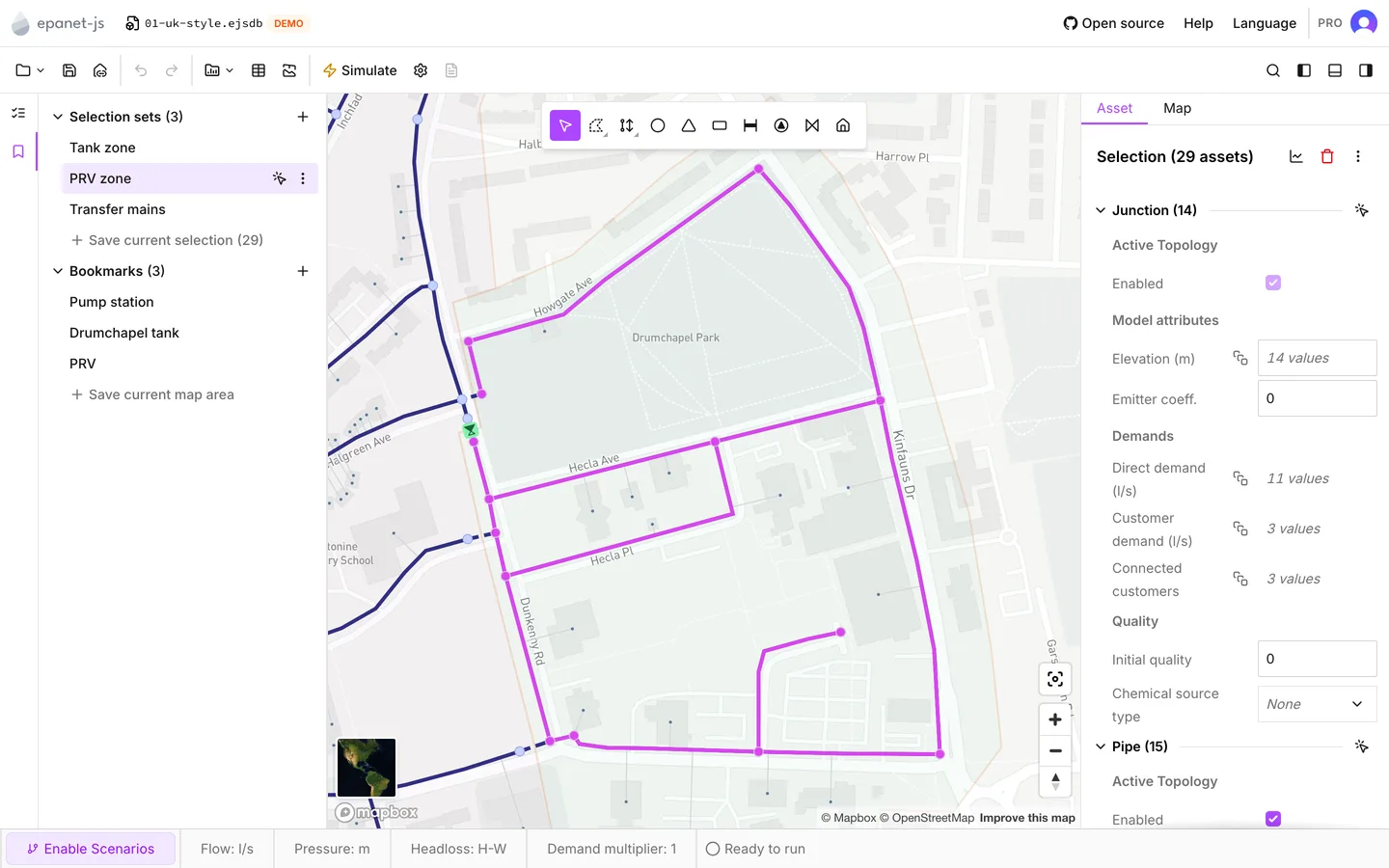
Selection sets and bookmarks in the new Collections panel, on one of the demo networks.
A new activity bar, and data tables on demand
The left panel now features a reorderable activity bar housing tools like Network Review and Collections.
Data tables now open on demand rather than as a full default set. Checking Selected assets only filters tables strictly to selected elements, making targeted bulk edits fast. In asset panels, action buttons fold into a More actions menu on narrow screens to preserve label space.
Improvements
- Import wizard formats: Zone and customer point wizards now accept DXF, CSV coordinates, and mixed-geometry files with coordinate safety checks.
- Virtualised dropdowns: Dropdowns with >100 options (nodes, curves, patterns) render only visible rows for faster performance.
- Network Review integration: Clicking validation errors opens the corresponding asset panel directly.
- Localized errors & sign-in: Sign-in and project loading errors now display translated messages across all 7 supported languages.
- Memory optimization: Opening projects unloads existing models first to reduce browser memory usage.
- Updated demo networks: Demo projects now feature sample collections and updated thumbnails.
Fixes
Model build
- Fixed pipe splitting and snapping behavior during node movement; auto-repair applies to existing drifted projects.
- Invalid geometries, duplicate file drops, and corrupted zip archives no longer crash imports.
- Fixed memory limits for large map previews (>1M features) and preview unit labels.
INP import and simulation
- Preserved
ACTIVEvalve statuses and custom unit displays for level-based pump controls. - Synergi import now correctly maps throttle control valves as PCVs.
Scenarios and data
- Prevented deletion of active curves/patterns and locked customer point imports while in scenario mode.
- Preserved elevations during failed lookups and enabled scenario rename/delete without active switching.
Map and interface
- Resolved selection highlight glitches during map pans and eliminated map reloads during auth state changes.
- Fixed Y-axis quick graph scaling, tooltip overlaps, and custom projection GeoJSON exports.
What’s next
- Scripting in epanet-js. We’re bringing code-based automation directly into epanet-js, allowing you to trigger any action programmatically. You’ll be able to edit models, run simulations, perform optimizations, automate repetitive workflows, and build custom functionality right inside the app.
- More advanced control types. Adding support for flow-modulating valves (adjusting pressure setpoints based on flow) and floating continuous regulation valves for tank inlets.
- Scenario and demand controls. Introducing demand scaling by zone or profile, and making zones first-class assets with full selection support and custom attributes.
- Better model conversions. Continued improvements across conversion tools to bring in external models cleanly.
- Sensor data, custom graphs, and scenario comparisons. Initial discovery and design around live sensor data import for model calibration, combined with custom graphing and side-by-side scenario comparisons.
- Fire flow and multi-simulation runs. Exploring flexible simulation selection under a single scenario—allowing you to easily switch or run hydraulics, water quality, and native fire flow analysis.
Support EPANET by using software that supports it back.
— Luke and Sam