Very large models, crash recovery, and custom attributes from your GIS
Most of July went into scale and reliability. The headline is performance: the map has been rebuilt to support very large networks, and we’ve been testing against real models up to 500,000 assets. Alongside it are crash recovery, which finds your model on reopen if a session ends before it can save properly, and custom attributes mapped straight from the model build.
Away from the app, we published our first case study and a new security page setting out exactly where your model data lives.
Also this month: pipe roughness inferred from material and age, zip file support in the model build, an on-demand refresh for elevations, and a longer 64-character limit on asset labels.
Performance at any model size
Performance falls away on most modeling platforms once a network gets large enough, and past a certain size it stops being workable at all. We want epanet-js to be the fastest platform to work in whatever the size of your model, so this month Sandra rebuilt the way the map draws a network. We’ve been testing against real models up to 500,000 assets.
To find the limit, we built a model of every water main in the state of Kentucky: 318,000 junctions, 350,000 pipes, 783 pumps, 2,050 PRVs, 2,653 reservoirs, and 1.6 million customer points, across more than 60,000 miles of pipe. The map pans and zooms at 60 frames per second, and the simulation solves in 3 seconds over 32 iterations. EPANET has always been a fast engine. The work here was giving it an interface that keeps up at that scale.
The short version of how: epanet-js no longer hands the map a copy of your whole network. Geometry stays in compact numeric buffers, and the map tiles are generated from those buffers on demand, on your machine, covering only the part of the network on screen. Memory now scales with what you’re looking at rather than with the size of your model, and that’s what takes the ceiling out. Sandra is writing up the full story, and we’ll post it here soon.
On an everyday model you’ll notice this as things being quicker. On a very large one, it’s the difference between working and not.
Crash recovery
Until now, if epanet-js closed before your work was fully saved, whether from a crashed tab, a lost connection, or a forced quit, there was no way back to it beyond your last save.
Now epanet-js recognizes when a previous session didn’t shut down cleanly. Reopen the app and, if a recoverable model is found, a dialog offers to restore it, showing when it was last changed and when it was last saved so you can tell at a glance whether anything would be lost.
The save path itself got sturdier too: if a write to the local database fails partway through, epanet-js now recovers the last state that was successfully saved instead of leaving the model in between.
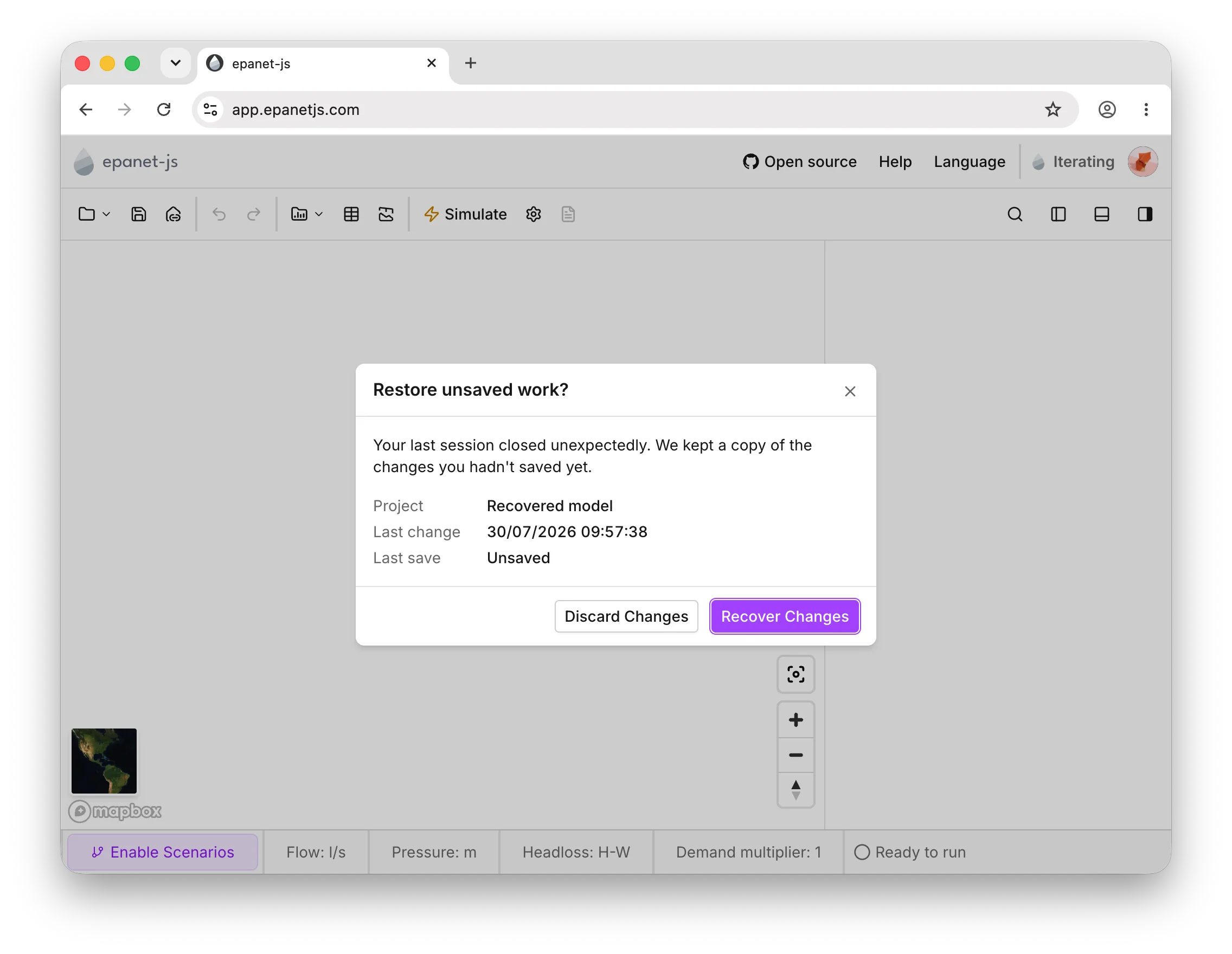
Reopening after an interrupted session offers to restore your model, with the last change and save times shown.
Custom attributes from your GIS
Paid plansCustom attributes landed in June: your own text and numeric fields on any asset type, kept with the model. What was missing was a way to get them in. Fields you already held in GIS had to be recreated by hand once the model was built.
The model build’s mapping step now handles custom attributes directly. Map a GIS field to a custom attribute alongside the standard ones, and that data arrives with the model from the first step. Custom attributes are included in exports too, so what you bring in comes back out.
Roughness inferred from material and age
Paid plansThe pipe library, which launched in June, holds a roughness table for each pipe material, broken down by age. Until now you applied it: epanet-js worked out each pipe’s age from its installation year, found the matching row, and wrote the value into the model as a fixed number.
Now the library is read from the pipe itself. Roughness is inferred from a pipe’s material and installation year and shown as its default value, in the same light gray italics as every other default in epanet-js. Put cast iron at 80 years in the library at a C of 75, and every cast iron pipe of that age reads 75 without anything being written into your model.
Overrides work the way you’d expect. Type a value over the top while you’re calibrating and that pipe keeps yours. Clear it and the pipe falls back to the library. Adjust the library and every pipe still on its default follows.
Between the two you can get sensible roughness across a whole network in one step, then spend your time on the pipes where calibration data says something different.
Roughness inferred from the pipe library shows as a default value; anything set by hand stands out against it.
Elevations refreshed on demand
Paid plansElevations are normally fetched once, when you draw a node. If the source terrain data changes, or it was not filled in properly when drawing or it was missing for some other reason, there was no way to update it after the fact.
A new recalculate action recomputes elevation for the assets you select (either nodes with missing values or all of them), whenever you need it, rather than only at the moment they’re drawn.
Drawing a node or link is sturdier too: epanet-js now shows a wait cursor and briefly locks editing while the elevation is being fetched, so an asset can’t end up without one in the first place.
Recompute elevation for selected assets at any time.
Our first case study
We published the first epanet-js case study this month: Warren County Utility District, a Tennessee utility serving 34,000 people through roughly 900 miles of pipe.

Warren County Utility District, McMinnville, Tennessee.
It answers a question a lot of mid-size utilities are sitting on. Can you build and maintain a full distribution model in-house, without a specialist on staff or a five-figure software budget? Warren County had been sending routine hydraulic questions to their consulting engineers, or working them out from SCADA flows and tank levels. When they needed to know which of three six-inch mains was actually carrying the water, temporary metering was quoted at $5,000 to $6,000 per line.
Wyatt Wilson, one of two engineers at the district, imported the entire 900-mile GIS network into epanet-js instead.
I picked a rainy day, opened it up, and played with it, watching the videos on one screen and the model on the other. After an eight-hour day of playing around, I felt like I knew everything I could do with it.
— Wyatt Wilson, Warren County Utility District
Two parts of their experience stood out to us. The network review flagged topological disconnects hiding in the GIS, and fixing those at the source improved the district’s data well beyond the model itself. And checking model runs against SCADA flows and tank levels gave them enough confidence to settle the flow routing question: “It’s obviously not perfect,” Wyatt says. “But it’s really darn close. Close enough to give you the information you need to know.”
The model is now part of the routine. The district screens fire hydrant requests, tests how to isolate a leak, and evaluates line extensions in hours rather than weeks. In-house modeling hasn’t replaced their consulting engineers; routine screening happens internally, and the consulting budget goes to the complex designs and formal studies where that expertise counts.
Thank you to Wyatt and the team at Warren County for sharing how they work. Read the full case study.
A new security page
Where model data lives is one of the first questions utilities and engineering firms ask us, so we’ve written the answer down properly. The new security page sets out exactly how epanet-js handles your infrastructure and customer data.
The default is simple: everything stays local to your device, and we have no access to your models. A project is created, run, and saved entirely on your local or network drive, the same way project files work in InfoWorks, WaterGEMS, or InfoWater. The application loads over HTTPS, and the simulation engine then runs on your own machine, so neither your network topology nor your customer data touches our servers. Once the page has loaded, you can disconnect from the internet and keep working offline.
Cloud features are opt-in per project, and the page covers those too: workspace roles, the data region your models are stored in, and encryption in transit and at rest. It also covers the two enterprise setups for teams with stricter policies, keeping model data in cloud object storage you own, or running the whole deployment inside your own network.
If you’re working through an internal review, our generic security questionnaire answers the questions utilities and engineering firms have put to us before, so your IT team can fill out their own forms without waiting on us.
Improvements
- Zone import moved: The zone import button now lives in the file dropdown instead of its own separate control.
- Localized export headers: Asset data exports now use column headers in your app language, extending the localization work from June’s model build.
- Huge INP exports: Saving a very large INP now streams to disk as it goes, instead of assembling the whole file in memory first.
- Complete asset mapping required: The model build now blocks you from finishing until every asset type has been mapped, so you don’t end up with gaps you didn’t intend.
- Sign in without leaving the app: Sign-in now opens in a popup instead of navigating away from what you were doing.
- Reprojection resilience: Projecting a model now handles poor or interrupted network connectivity more gracefully instead of failing outright.
- Smarter data tables: Copying now includes each field’s default value when it’s empty, selected rows stay selected while scrolling, epanet-js tells you when copying is blocked by a missing clipboard permission instead of failing silently, and keyboard cell range selection is improved so it no longer crashes on large selections.
- Model build polish: Tabs now sit at the top of the page, the mapping step no longer jumps around as content loads, labels have more room, and the field search added in June caps results to 5 options and no longer bounces while typing.
- Zip files in the model build: Load a zip directly as a data source, including a zip that contains another zip, without extracting anything first.
- Longer labels: Asset labels can now run up to 64 characters.
Fixes
INP import/export stability
- Importing an INP file with an unsupported or missing unit now falls back to a default and flags it in the import issues.
- Importing an INP file with non-numeric coordinates no longer breaks the model; coordinates are now validated on import.
- Importing an INP with a custom constant demand pattern does not incorrectly change the demand pattern to the default pattern.
- Importing an INP file with a missing or unsupported valve kind now falls back to TCV, flagged in the import issues, the same pattern used for the headloss-formula fallback in June.
- Importing a very large INP file no longer fails with a checksum range error.
- Exported INPs truncate long labels so they are fully compatible with plain EPANET.
Resource and network resilience
- Opening a model on a resource-constrained system (low memory or CPU) no longer locks up the app.
- Model files now load correctly even when the browser’s local storage quota has been exhausted.
- Fixed a crash that could occur when simulation result files were temporarily unavailable in local storage; the app now warns instead.
- Fixed a bug that could prevent the open-file dialog from opening.
- Opening a project from the recent files list no longer errors on slower machines.
Others
- The patterns table now computes timestamps from the simulation’s own settings, instead of showing incorrect ones.
- Customer points now show up correctly in the search bar again.
- Drawing a node or link now shows a wait cursor and briefly locks editing while its elevation is being fetched, so assets don’t end up without one.
- Fixed a crash in the data tables caused by rapid updates on large selections.
- Cancelling the save dialog for a custom graph no longer throws an error.
- The map no longer shows an empty right-click menu when nothing is selected.
What’s next
Two things we’re focused on next.
- Building and calibrating models faster. We’re staying on the model build, and on the validations and network reviews you work through to get a new model running. We want epanet-js to be the fastest way to build a model and calibrate it.
- More advanced controls, in the engine itself. Some of this work belongs in EPANET rather than in our app, so we’ll be submitting changes directly to the open source project. The first is an RFC we’ve opened on embedding Lua in EPANET, which would let you write control scripts inside the INP file itself, for cases the built-in controls can’t cover: remote sensor controls, flow-modulated valves, and variable speed pumps. There’s a working prototype attached to the RFC, and we’re working toward a pull request. If you have thoughts on the design, we’d like to hear them.
Support EPANET by using software that supports it back.
— Luke and Sam