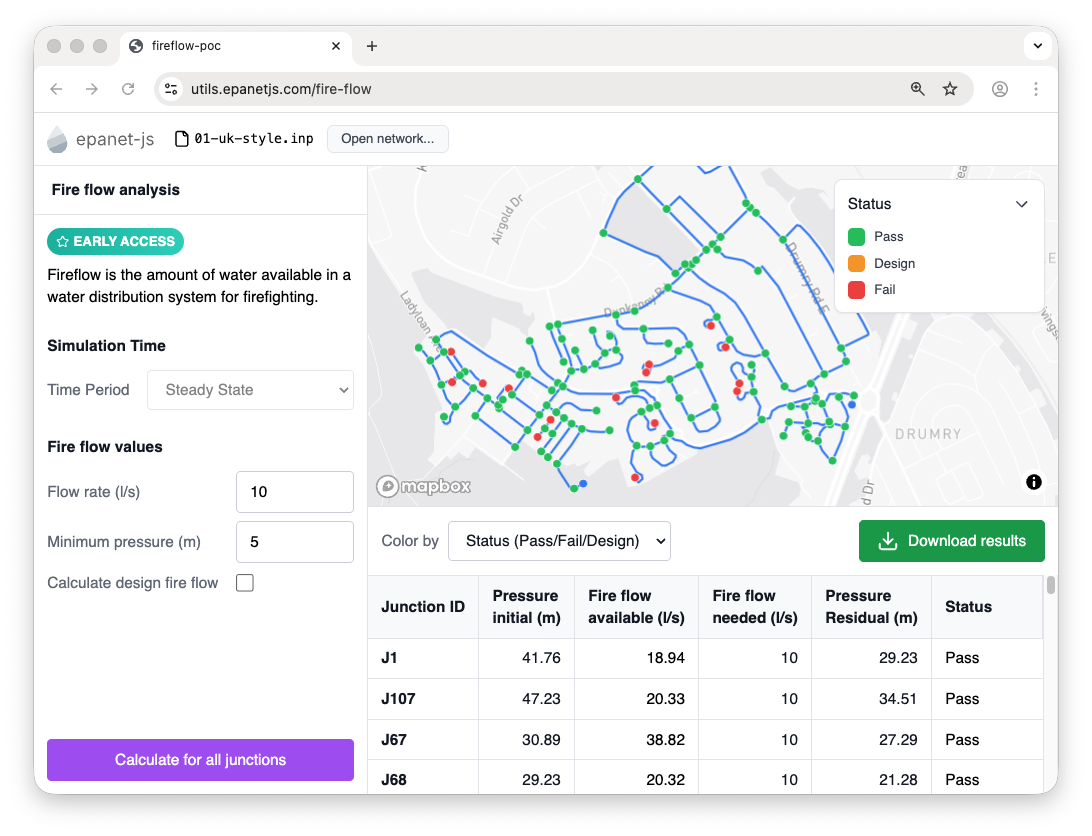
Evaluate Available, Needed, and Design fire flows against minimum residual pressures system-wide. Map capacity bottlenecks and generate instant pressure-flow curves to support development planning.
No login needed
Capacity questions drive daily engineering workflows: Can the network support a proposed subdivision? Will a specific hydrant meet fire code without violating residual pressure limits? Where are the system bottlenecks, and what upgrades are required to resolve them?
Answering these inquiries by manually editing junction demands and rerunning simulations is slow and error-prone. epanet-js automates this with two dedicated tools: a system-wide fire flow analysis for network-level planning, and a pressure-flow curve generator for localized, in-depth capacity checks.
Run fire flow assessments on every hydrant or junction simultaneously. epanet-js evaluates each location against three core criteria:
Evaluating fire flow across a distribution network shouldn't require complex batch configurations or dummy demand allocations. epanet-js automates the entire process, executing thousands of background simulations at hundreds of nodes per second—entirely on your local machine. You simply set your residual targets, and the software handles the iterative hydraulic solves.
Because it leverages the EPANET 2.3 engine with native support for Pressure-Dependent Demands (PDD) and emitters, the calculated flows reflect the true physical response of the system under stress, rather than an oversimplified fixed-demand approximation.
When you need to evaluate a specific location in depth, the Pressure-Flow Analysis tool generates a comprehensive hydraulic performance curve. It models the system's response across a progressive range of flows (e.g., 0 to 2,000 gpm), plotting the exact pressure degradation curve at the node.
This provides an immediate, verifiable answer for developer inquiries—whether evaluating a proposed commercial connection, a new subdivision feed, or a fire sprinkler booster system. Because the results overlay visually, you can immediately identify the upstream pipes and valves causing the capacity constraint.
Both tools map results dynamically, highlighting capacity bottlenecks and robust pressure zones across the network. Instead of parsing dense output tables, engineers and master planners can visually identify exactly which mains and zones require reinforcement.
When it's time to document the findings, export the exact flow and pressure results directly to GIS layers (Shapefile/GeoJSON) or CSV. The data is immediately ready for master plan reports, municipal capacity registers, or developer response letters.
Fire flow analysis
| Junction | Available (l/s) | Status |
|---|---|---|
| J107 | 47.2 | Pass |
| J67 | 30.9 | Fail |
| J288 | 27.3 | Pass |
Determine the available fire flow at any hydrant or junction while ensuring residual pressures remain above regulatory minimums.
Execute thousands of simulations locally in seconds, evaluating every hydrant automatically without manually editing junction demands.
The Design Fire Flow check flags upstream pressure drops and velocity violations, ensuring local hydrant compliance doesn't mask wider network failures.
Generate instant pressure-flow curves for any junction to support development inquiries, then export results directly to GIS or CSV.
Run automated fire flow analyses on your own hydraulic model. Launch epanet-js, or book a demo to see it applied to your network.
No login needed
System-wide fire flow analysis provides a clear, quantitative map of network capacity. By identifying exactly where available flows fall short of regulatory requirements, utilities can prioritize water main upsizing, loop closures, and booster station upgrades based on hydraulic evidence rather than estimates.
Fire flow analysis is one part of understanding network performance.
Frequently asked questions about fire flow and capacity analysis.
Map available flows and generate pressure-flow curves in seconds. Launch epanet-js or schedule a technical walk-through.
No login needed